TapStack Studio

For everyday plans and priorities

Lifestyle Planner

Bring goals, habits, wellbeing and finances into a planner that feels like your own.

£5.39 £10.79 Sale price · GBP

One-time digital purchase · No subscription · No software login

Price checked 6 October 2026. See Etsy for the latest price and exact edition included.
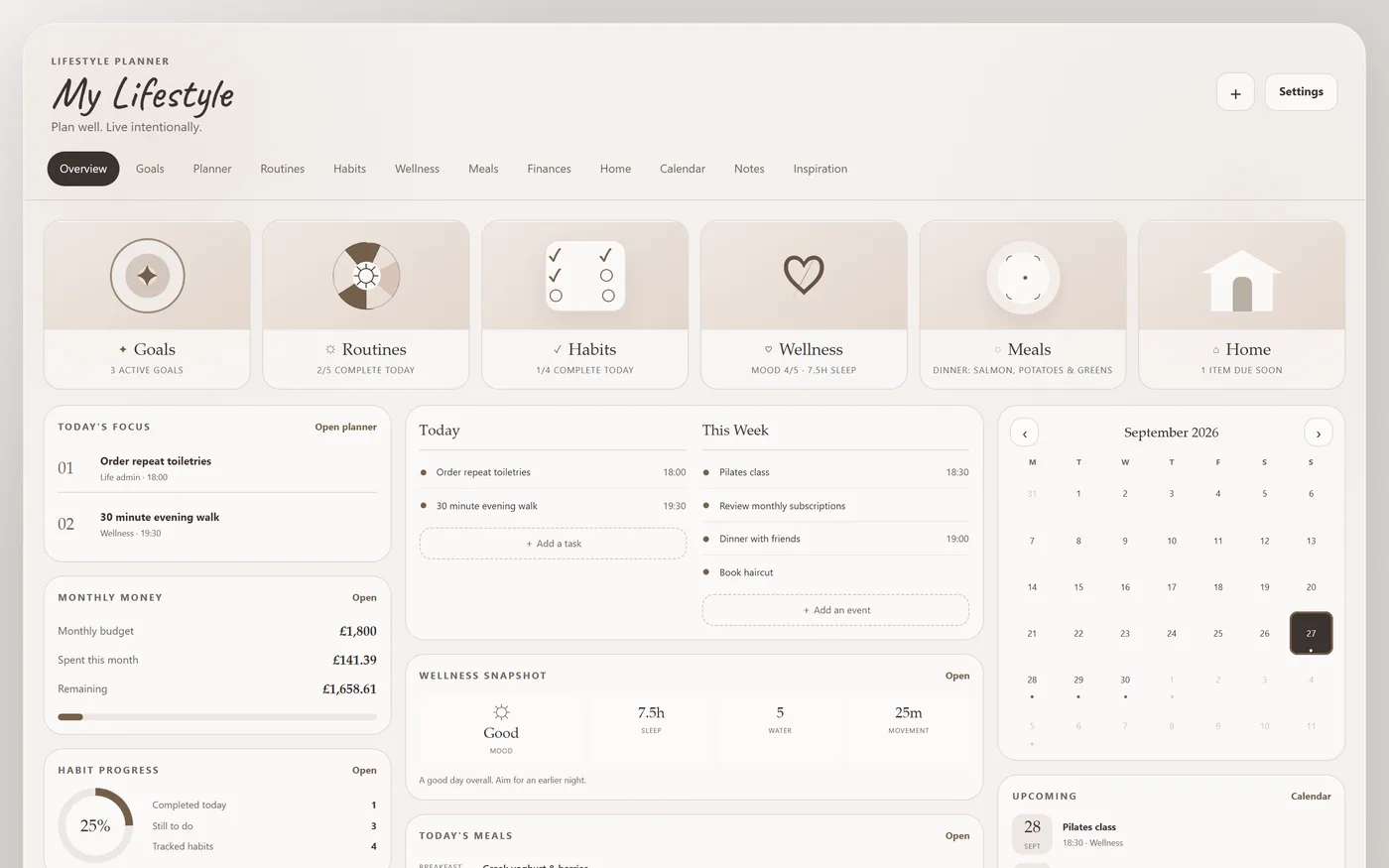
Lifestyle Planner: overview with example data
Actual product screenshot showing example data.

Built around your day

Useful details, all in one place.

Your whole life at a glance

  • Today’s focus, tasks and this week
  • Money, wellness and habit progress
  • A calendar of everything coming up

Turn intentions into progress

  • Goals by area of life with target dates
  • Progress bars and status
  • Filter by not started, in progress or complete

Build habits that stick

  • Tick habits off through the week
  • Weekly targets and progress
  • Your best current streak

Check in with yourself

  • Mood, sleep, water and movement
  • Energy and a note for each day
  • Your averages over time

Stay on top of your money

  • Monthly budget, income and spending
  • Every transaction by category
  • See what’s left to spend

Take a closer look

See the real dashboard.

Open a screenshot for a closer look, or try the demo to explore the features yourself.

Your download

What’s included.

  • The Lifestyle Planner
  • Web link for any device
  • Start Here setup guide
  • Example planner to explore
  • 21 themes & backup
  • One-time purchase, no login

Getting started

Make it yours.

  1. Explore the demo and check the Etsy listing for your preferred edition.
  2. Purchase and follow the included Start Here guide to open your dashboard.
  3. Personalise your settings, enter your details and export a backup regularly.

Designed for a browser on computer, phone or tablet. Data stays in the browser where you use it; moving between devices requires exporting and importing a backup. Try your intended device with the demo before purchasing.

Before you buy.

Will my changes in the demo be saved?

No. The demo uses example data and resets when you refresh. Your purchased edition includes its own saving and backup features.

How do I save and back up my information?

Follow the included setup guide and use your dashboard’s backup and restore controls. Keep exported backups somewhere safe, especially before clearing browser data or changing devices.

Where can I check the price or ask a question?

Visit TapStack Studio on Etsy for the current listing, price, included files and a way to contact the studio.

See if it fits your day.

Explore the working demo, then choose your edition in the Etsy shop.